Reviews
PJ Masks Color Art Game provides a wonderful creative outlet for preschoolers. The simple tap-to-fill controls are perfect for little hands. With no scores or time pressure, children can focus on art and color recognition. The print feature is a nice bonus for displaying finished work. A great choice for quiet play.
Description
Game Introduction
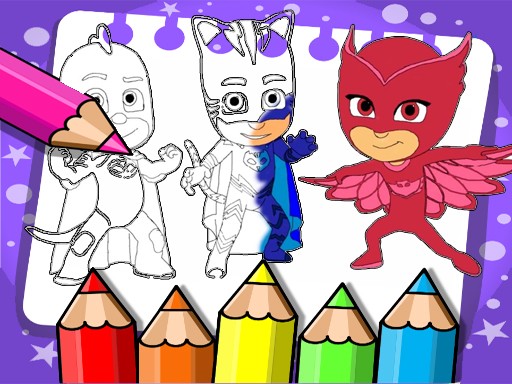
PJ Masks Color Art Game is a digital coloring activity designed for young children. Based on the popular PJ Masks characters, this game offers a safe and creative space where kids can color scenes featuring Catboy, Owlette, and Gekko. The core objective is simple: choose an image and fill it with colors using an on-screen palette. There are no time limits, scores, or competitive elements, making it a relaxing and pressure-free experience. This game is ideal for preschoolers and early elementary children who enjoy art and their favorite nighttime heroes.
How to Play
Playing is straightforward. First, select one of the available coloring pages from the game menu. Each page shows a different pose or scene with the PJ Masks characters. Then, pick a color from the palette displayed on the side of the screen. Tap or click on the area you wish to color, and the fill will apply instantly. You can switch colors at any time to create your own unique design. There is no rush—children can color at their own pace. If a mistake is made, simply select a new color and tap the area again to change it. Once the picture is complete, a print option allows you to save a physical copy. The controls are designed for small fingers and work on both computers and tablets. No registration or login is required, ensuring a private and safe experience.
Game Features
Features include multiple coloring pages featuring the PJ Masks characters. A simple color palette with a variety of shades is provided. The game uses easy tap-to-fill controls suitable for young children. There are no time limits or pressure to finish quickly. A print function is available to save and share completed artwork. The environment is safe and free from violent or scary content. The game works on desktop and mobile devices without requiring any downloads. It encourages creativity, color recognition, and fine motor skills in a fun, ad-free setting.
Tips for Success
Encourage children to experiment with different color combinations to make each picture unique. Let them take their time—there is no rush to finish. If they make a mistake, show them how easy it is to correct by selecting a new color. Printing completed artwork can boost confidence and provide a sense of accomplishment. For younger children, parents may help by pointing out different colors and naming them as they play. This can also be a great opportunity to practice fine motor skills by guiding the child's hand on the mouse or touch screen.




Comments
Sign in to leave a note
You must be logged in before posting a review or rating.
No account? Create one
No comments yet. Be the first to comment!