Reviews
Canopy Crossing Quest delivers a focused platforming experience that respects your time. The two-phase structure—first swinging through the trees, then swimming past obstacles—prevents monotony and tests different skills. Controls feel tight on both keyboard and touchscreen, which is essential for a game built around timing. The scoring system, with extra lives earned at regular intervals, gives strong incentive to replay levels and improve. It runs smoothly in any modern browser without plugins, making it an excellent choice for a quick gaming session. A solid entry in the family-friendly arcade genre.
Description
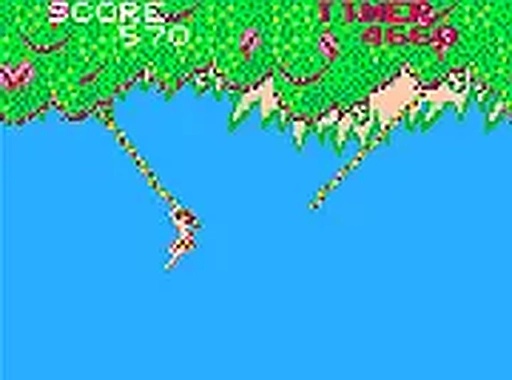
Vine-to-Vine Navigation
Players guide their character across a series of hanging vines suspended between tall trees. Each leap requires precise timing and a good sense of distance. Miss a vine and the explorer tumbles into the water below, ending the run. The challenge increases as vines become spaced farther apart, demanding sharper reflexes and better planning. This core mechanic creates a satisfying rhythm of short bursts of concentration and quick adjustments.
River Crossing Phase
After clearing the vine section, the action shifts to a swimming segment. Here, players must steer the explorer through moving water while avoiding floating logs, rocks, and other natural obstacles. The controls remain responsive, but the change in movement style adds variety to the gameplay. Success in this phase depends on reading the water flow and making split-second directional changes.
Scoring and Extra Opportunities
A timer tracks how quickly players complete each stage. Finishing faster results in a time bonus added to the total score. Every 1,000 points earned grants an additional life, with another bonus life awarded at the 30,000-point mark. This system encourages repeated attempts to improve times and reach higher scores, extending play sessions without requiring any purchases.
Platform and Accessibility
The game runs entirely in a web browser, with no downloads or installations needed. It works smoothly on both desktop computers and mobile devices, using keyboard inputs or touchscreen taps. A full-screen mode is available for those who prefer a larger view. This straightforward setup makes it easy for anyone to start playing immediately, regardless of technical experience.





Comments
Sign in to leave a note
You must be logged in before posting a review or rating.
No account? Create one
No comments yet. Be the first to comment!