Pixel Differences Puzzle Game is a well-made spot-the-difference experience. The pixel art is charming and each level offers a fair challenge. Controls are responsive on both desktop and mobile. The hint system helps without spoiling the fun. With multiple themed levels, replayability is good. It is a great choice for casual players who enjoy observation puzzles. The game loads quickly and runs without issues. Overall, it is a solid, family-friendly game that respects your time.Game
Reviews
Pixel Differences Puzzle Game is a well-made spot-the-difference experience. The pixel art is charming and each level offers a fair challenge. Controls are responsive on both desktop and mobile. The hint system helps without spoiling the fun. With multiple themed levels, replayability is good. It is a great choice for casual players who enjoy observation puzzles. The game loads quickly and runs without issues. Overall, it is a solid, family-friendly game that respects your time.
About This Game
Game Introduction
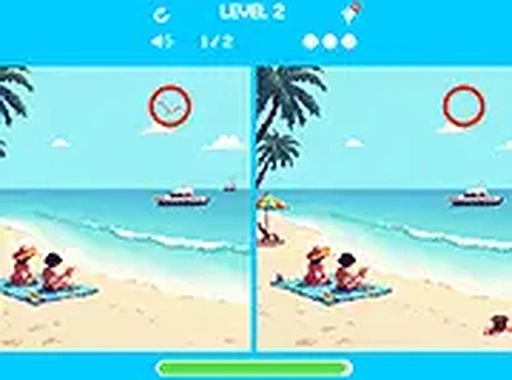
Pixel Differences Puzzle Game is a relaxing observation puzzle where players compare two similar pixel art images side by side. The core objective is to find subtle differences between them, such as color shifts, missing objects, or moved elements. Designed for players of all ages, the game offers a cheerful atmosphere with vibrant pixel graphics. Levels are themed and progressively become more challenging, making it suitable for both short breaks and longer play sessions. No downloads or installations are required, as the game runs smoothly in any modern web browser.
How to Play
Players look at both images carefully and tap or click on the area where a difference is spotted. Each level contains a specific number of differences to find. Finding all differences unlocks the next level. A hint button is available to help when needed, highlighting one difference without revealing its exact location. The game supports touch controls on smartphones and tablets, and can be played in full screen mode for a better view. Focus on small details like color changes, missing parts, or objects that have moved. The game tracks your progress and score.
Game Features
Features include colorful pixel art graphics, multiple themed levels with increasing difficulty, simple tap or click controls, hints for stuck players, mobile-friendly design that works on all devices, free-to-play with no downloads, full screen mode for immersive play, and suitability for all ages.
Tips for Success
To improve your observation skills, start by scanning each image systematically, such as from top to bottom or left to right. Pay close attention to small details like color variations, missing elements, or objects that have shifted position. Take your time and avoid rushing, as differences can be subtle. Use hints sparingly to save them for challenging levels. Practice regularly to train your visual memory and attention to detail. Playing in a distraction-free environment can also help you spot differences more quickly.
Compatibility
💻 Desktop | 📱 Mobile | 📟 Tablet – All supported · Best with Chrome or Safari




Leave a Review